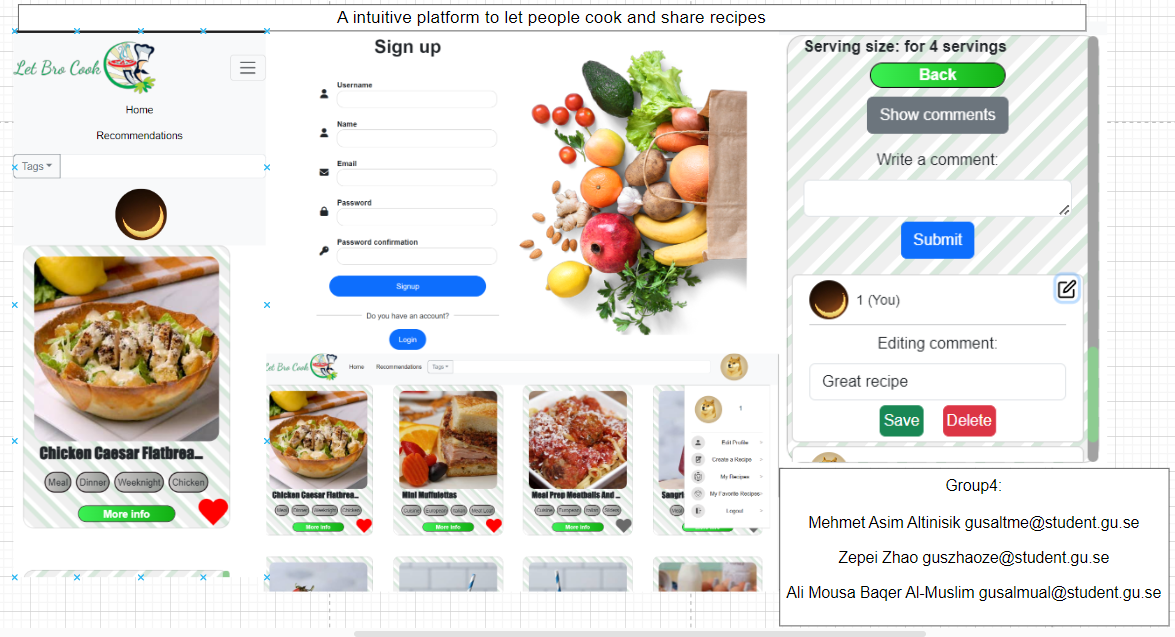
LetBroCook
Backend and Frontend Template
Latest version: https://git.chalmers.se/courses/dit342/group-00-web
This template refers to itself as group-00-web. In your project, use your group number in place of 00.
Project Structure
| File | Purpose | What you do? |
|---|---|---|
server/ |
Backend server code | All your server code |
| server/README.md | Everything about the server | READ ME carefully! |
client/ |
Frontend client code | All your client code |
| client/README.md | Everything about the client | READ ME carefully! |
| docs/DEPLOYMENT.md | Free online production deployment | Deploy your app online in production mode |
| docs/LOCAL_DEPLOYMENT.md | Local production deployment | Deploy your app local in production mode |
Requirements
The version numbers in brackets indicate the tested versions but feel free to use more recent versions. You can also use alternative tools if you know how to configure them (e.g., Firefox instead of Chrome).
- Git (v2) => installation instructions
- Add your Git username and set your email
git config --global user.name "YOUR_USERNAME"=> checkgit config --global user.namegit config --global user.email "email@example.com"=> checkgit config --global user.email
-
Windows users: We recommend to use the Git Bash shell from your Git installation or the Bash shell from the Windows Subsystem for Linux to run all shell commands for this project.
- Add your Git username and set your email
- Chalmers GitLab => Login with your Chalmers CID choosing “Sign in with” Chalmers Login. (contact support@chalmers.se if you don’t have one)
- DIT342 course group: https://git.chalmers.se/courses/dit342
- Setup SSH key with Gitlab
- Create an SSH key pair
ssh-keygen -t ed25519 -C "email@example.com"(skip if you already have one) - Add your public SSH key to your Gitlab profile under https://git.chalmers.se/profile/keys
- Make sure the email you use to commit is registered under https://git.chalmers.se/profile/emails
- Create an SSH key pair
- Checkout the Backend-Frontend template
git clone git@git.chalmers.se:courses/dit342/group-00-web.git
- Server Requirements
- Client Requirements
Getting started
# Clone repository
git clone git@git.chalmers.se:courses/dit342/group-00-web.git

# Change into the directory
cd group-00-web

# Setup backend
cd server && npm install
npm run dev

# Setup frontend
cd client && npm install
npm run serve
Check out the detailed instructions for backend and frontend.
Visual Studio Code (VSCode)
Open the server and client in separate VSCode workspaces or open the combined backend-frontend.code-workspace. Otherwise, workspace-specific settings don’t work properly.
System Definition (MS0)
Purpose
The aim of our project is to create a website where users can share and view recipes essentially. Viewers will need to sign, create an account or sign in with google. Then users are free to browse our catalog of recipes. Each recipe has numerous descriptive elements we call “tags’’ that inform users who are viewing a recipe what it contains. Example tags could be “vegan”, “breakfast”,”cheap” etc. Moreover users can review recipes with both free text and a star system rating.
CRUD operations
Create: Users will be able to create recipes, reviews, preferences and a favorites recipe list.
Read: Provide users with recipes to view using the cards design pattern where users browse, search and filter them. Moreover, users can view other users’ accounts.
Update: Users will have the ability to edit their recipes, reviews, and preferences
Delete: Users can delete their account, remove recipes from their favorites list, and delta reviews or recipes they previously posted.
Pages
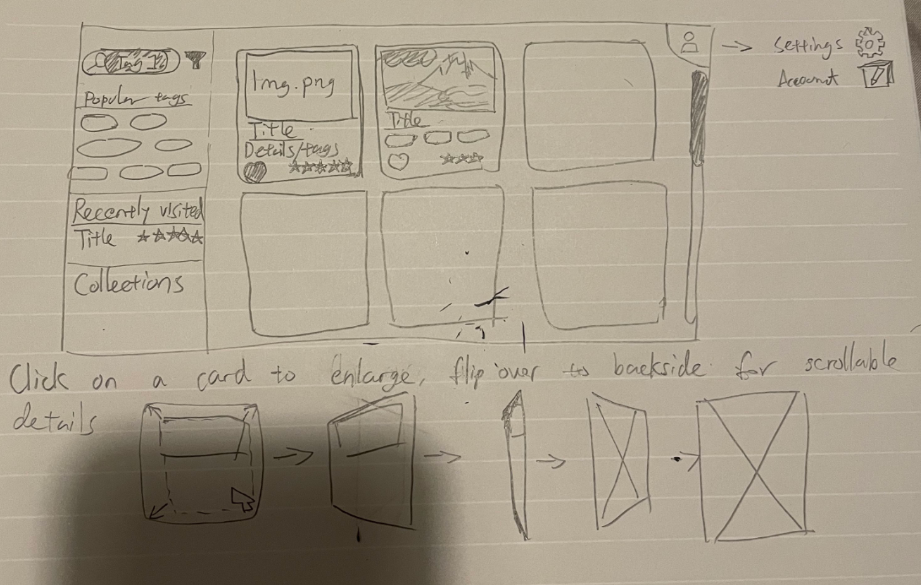
- Home page: The user is presented with a view of cards. Each card can be enlarged to view the full recipe with instructions, ingredients, associated tags and comments.
- Recipe creation page: The user is asked to fill out recipe information according to a template, and be able to select one or more tags.
- Settings: The user is able to alter their preferences, password, autoplaying videos, using different measurements, etc.
- Profile: Users are able to view their history of browsed recipes, created recipes, and statistics such as which tags they view the most and relatively simple analytics about their behavior.
- Favorites: The user has all their favorite recipes in there.
Initial UI sketch
Initial paper sketch of what the systems frontend could look like:
Entity-Relationship (ER) Diagram
Teaser (MS3)
Teaser